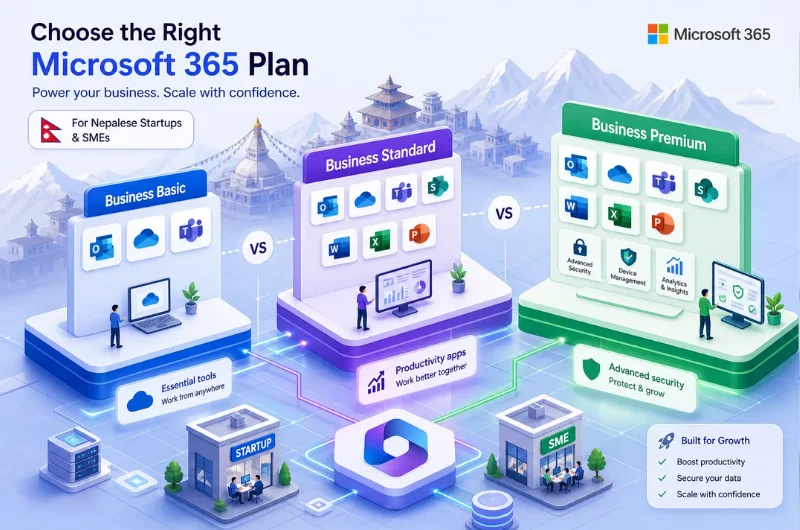
Choosing the right Microsoft 365 Business Basic plan is a frequent challenge for Nepalese startups and SMEs, and it’s easy to see why. Microsoft’s 365 business lineup looks straightforward until you’re actually choosing between three plans with nearly identical names, overlapping feature lists, and real pricing differences that add up fast when you’re paying per user. Basic sounds right until you’re not sure what “web apps only” actually means for your team’s daily work. Standard sounds safer but costs nearly double. And Premium sounds like something reserved for large enterprises with a dedicated IT department.
The frustration is real, and the wrong choice is expensive in both directions. Buy too little and your team hits limitations within weeks. Buy too much and you’re paying for security features a five-person team doesn’t need yet. Some local businesses work with a Microsoft Partner like Webtech Nepal to make this call correctly from day one, especially when domain configuration and email migration are part of the picture. This article walks you through exactly what each plan covers, where Microsoft 365 Business Basic falls short, and how to get set up without losing email continuity in the process.
What Microsoft 365 Business Basic actually includes
Core apps and services you get
Business Basic (formerly Office 365 Business Basic) delivers web and mobile versions of Word, Excel, PowerPoint, and Outlook, but no locally installed desktop applications. That distinction matters more than it sounds. You also get Exchange Online for custom business email, Microsoft Teams for chat and video meetings, OneDrive for cloud file storage, SharePoint for team document collaboration, and additional tools including Planner, Bookings, and Forms. “Web and mobile apps only” is the defining characteristic of this tier, and every other plan comparison flows from that single fact.
Microsoft 365 Business Basic: pricing and commitment options in 2026
After Microsoft’s July 2026 pricing update, Business Basic is $7.00 per user per month on an annual commitment or $8.40 per user per month on a month-to-month basis. (Check Microsoft’s current pricing page to confirm these figures, as list prices can vary by region and reseller.) The plan covers organizations with up to 300 users across the Business plan family. For a ten-person team on the annual plan, that works out to $840 per year, meaningful for a startup watching every line of its operating budget.
Storage and mailbox limits
According to Microsoft’s Exchange Online service documentation, each user gets a 100 GB mailbox, shared mailboxes are capped at 50 GB, and OneDrive provides 1 TB of cloud storage per user. For most startups and small teams, these limits are generous enough to grow into for several years. The mailbox limit is worth tracking if you’re migrating from a host that offered unlimited email storage, since some teams accumulate more than 100 GB in legacy accounts over time.
Business Basic vs Business Standard vs Premium: where each plan draws the line
The desktop apps gap that most businesses miss
Business Standard’s primary addition over Basic is simple: locally installed desktop versions of Word, Excel, PowerPoint, and Outlook. Teams who use Excel for complex financial modeling, build large formatted Word documents, or work in areas with unreliable internet access will feel the gap within weeks of running Basic. Browser-based Office apps are capable, but they don’t match the performance or feature depth of the desktop versions for heavy daily use. If your team’s core work runs through Office apps rather than around them, this gap is the deciding factor.
Security and device management: where Premium is a different category
Business Standard does not add meaningful security features over Basic. The foundational security baseline is largely the same across both plans, which surprises many business owners who assume “more expensive” means “more secure.” The real security jump happens at Business Premium, which adds Intune device management, Azure Information Protection, and advanced threat protection tools. Most Nepalese SMEs don’t need those capabilities at launch, but it’s worth knowing what you’re not getting before a security incident makes that decision for you.
Feature comparison at a glance
The table below captures the key differences across all three plans so you can see the full picture in one place.
| Feature | Business Basic | Business Standard | Business Premium |
|---|---|---|---|
| Desktop Office apps | No | Yes | Yes |
| Web and mobile apps | Yes | Yes | Yes |
| Exchange Online (custom email) | Yes (100 GB) | Yes (100 GB) | Yes (100 GB) |
| OneDrive storage | 1 TB/user | 1 TB/user | 1 TB/user |
| Microsoft Teams | Yes | Yes + webinar features | Yes + webinar features |
| SharePoint | Yes | Yes | Yes |
| Intune device management | No | No | Yes |
| Azure Information Protection | No | No | Yes |
| Price (annual, per user/month) | $7.00 | $14.00 | ~$22.00 (verify current pricing) |
Which plan actually fits Nepalese startups and SMEs
Microsoft 365 Business Basic is the right starting point when…
Business Basic works well for teams that primarily work through a browser or on mobile devices, businesses moving from free Gmail or personal email addresses to a professional Microsoft infrastructure, and startups that need Teams for collaboration and OneDrive for file sharing without the added cost of desktop app licenses. It’s also the right call for organizations under 50 users that need to keep per-seat costs lean. If your team’s daily workflow doesn’t depend on heavy offline Office app usage, Business Basic covers everything you need.
When to move to Business Standard instead
If your team runs Excel-heavy reporting, edits large Word documents daily, or regularly works in locations with unreliable internet, Basic will frustrate them quickly. Business Standard at $14.00 per user per month (after the 2026 pricing update) is the right call for those workflows. Standard also adds meeting and webinar capabilities in Teams, per Microsoft’s plan comparison documentation, that client-facing businesses find genuinely useful, particularly for service companies running online consultations or training sessions.
Is Business Premium worth it for most SMEs?
For most Nepalese SMEs at the startup or small business stage, Business Premium is premature. It’s built for organizations that need centralized device management, compliance tooling, and advanced security policies across a managed fleet of devices. It makes sense to revisit Premium when your team grows past 50 users, when you’re handling sensitive client data at scale, or when regulatory requirements demand it. Starting there adds cost and complexity before you’re ready to use what you’re paying for.
Setting up Microsoft 365 Business Basic step by step
Activating your subscription and adding users
Start in the Microsoft 365 admin center by navigating to Billing, then Your products, and confirming that Business Basic shows as Active. From there, go to Active Users, add each team member, and assign them a Business Basic license. Once users are added, return to the admin center home, open Dashboard view, and select Go to Guided Setup to begin the configuration flow. The guided setup walks you through domain connection, email setup, and app activation in a structured sequence.
Connecting your custom domain and configuring DNS
Adding a custom domain to Microsoft 365 Business Basic requires four DNS changes on your domain registrar or hosting control panel:
- Add aTXT recordto verify domain ownership with Microsoft
- Update yourMX recordso inbound email routes to Exchange Online
- Add aCNAME recordpointing autodiscover to autodiscover.outlook.com
- Publish anSPF recordauthorizing Microsoft to send on your domain’s behalf
This is where most businesses hit trouble, especially when the domain registrar, hosting provider, and email setup are managed by different parties with different control panels. Webtech Nepal manages DNS configuration across both the domain and hosting environment together, which eliminates the handoff problems that typically cause email downtime during migration.
Finishing email, Teams, and OneDrive setup
Once DNS records propagate, complete the Outlook and Exchange Online configuration so each user can send and receive on their custom domain address. Set up Teams by walking the team through the desktop or mobile app installation and running a test call. Walk employees through OneDrive sync on their devices so files are accessible locally and in the cloud simultaneously. A staged rollout is completely valid here: activate services in phases rather than switching everything at once, which reduces disruption and gives staff time to adapt to each tool before the next one goes live.
Connecting Microsoft 365 to your business website
Setting up professional email on your custom domain
Once your domain is verified in Microsoft 365, email addressed to yourname@yourbusiness.com.np routes cleanly through Exchange Online. The critical step is ensuring the DNS records on your domain are configured correctly before the MX record points to Microsoft, so no mail is lost in transit. When Webtech Nepal handles both website setup and Microsoft 365 configuration, your email and website infrastructure are aligned from the first day the site goes live, eliminating the MX record conflicts that commonly break email delivery for businesses attempting to self-migrate while also launching a new site.
Embedding Teams and SharePoint into your website
A service business can embed a Teams meeting booking link directly on its contact or services page, letting visitors schedule calls without navigating away from the site. A client portal page can surface a SharePoint document library so clients access reports, contracts, or project files through the website. Note that SharePoint content typically requires appropriate Microsoft 365 permissions, so users may still need to sign in depending on how access control is configured. These integrations require coordinating the Microsoft 365 setup with the website build so both environments work together from launch.
Automating workflows between your website and Microsoft 365
Power Automate connects website events to Microsoft 365 actions without requiring custom code. A contact form submission on your website can automatically post a notification to a Teams channel and create a task in Planner for the relevant team member to follow up. A booking form can feed directly into a SharePoint list your team uses to track leads and service requests. Setting up these automations during the website build, rather than as an afterthought months later, means the workflows are live from day one, before teams are already overwhelmed with other priorities.
How Webtech Nepal migrates and supports local businesses on Microsoft 365
Migration planning and DNS management
A migration from cPanel hosting, Google Workspace, or personal email accounts to Microsoft 365 involves more than flipping a switch. The most common failures happen because the domain’s authoritative nameservers point to a different provider than where DNS records are being edited, because old MX or SPF records from the previous provider are still active, or because cPanel’s email routing setting wasn’t switched from local to remote before the MX cutover.
Webtech Nepal audits the existing email environment, builds a cutover plan that keeps email live through the transition, and manages DNS changes across the domain registrar and hosting environment simultaneously. Handling both the Microsoft 365 setup and managed hosting under one roof means both sides of the DNS equation stay coordinated, which is where self-managed migrations most often break down.
Ongoing training, support, and managed hosting
Getting the subscription active and DNS configured is only the first step. Without hands-on training, most teams revert to old habits: email threads instead of Teams channels, USB drives instead of OneDrive, and email attachments instead of SharePoint links. Webtech Nepal provides staff training so the tools your team paid for actually get used. Ongoing support covers subscription renewals, license adjustments as headcount changes, and integration updates when the website is upgraded or redesigned. Having Microsoft 365 management and website maintenance under one provider keeps costs predictable and support responsive, which matters most for Nepalese businesses without a dedicated IT team to manage these systems internally.
The right plan, set up correctly from day one
For most Nepalese startups and SMEs, Microsoft 365 Business Basic is the right entry point: professional email on a custom domain, Teams for collaboration, OneDrive for file storage, and web-based Office apps, all at $7.00 per user per month. If your team works heavily in Excel or Word offline, step up to Business Standard. If centralized device management and advanced security are on your radar, that’s when Business Premium enters the conversation.
The decision itself is straightforward once you know what each plan actually does. The harder part is getting the DNS configuration right, keeping email live through the migration, and making sure the subscription is connected to your website and domain properly. That’s where getting it wrong costs time and customers.
If you’re ready to get your Microsoft 365 Business Basic environment set up correctly, reach out to our team at Webtech Nepal for a migration assessment. We’ll review your current email setup, map out the DNS configuration, and move your team onto professional Microsoft 365 infrastructure without any downtime.
Frequently asked questions about Microsoft 365 Business Basic
Is Microsoft 365 Business Basic enough for a Nepalese startup?
For most early-stage teams, yes. Business Basic covers professional email on a custom domain, Microsoft Teams, OneDrive, SharePoint, and web-based Office apps. If your team doesn’t rely on heavy offline Excel or Word usage, you won’t outgrow it quickly, and the per-seat cost is the most manageable in the Business plan family.
What’s the difference between Business Basic and Business Standard?
The primary difference is locally installed desktop apps. Business Standard includes installable versions of Word, Excel, PowerPoint, and Outlook. Business Basic does not. Standard also adds Teams webinar capabilities. Both plans include the same mailbox size, OneDrive storage, SharePoint, and core security baseline.
Can I upgrade from Business Basic to Standard later?
Yes. Microsoft allows mid-cycle plan upgrades through the admin center. You can move individual users or your entire organization to a higher plan at any time. Upgrading mid-year typically results in a prorated charge for the remaining commitment period.
Does Business Basic include a business email address?
Yes. Every Business Basic license includes Exchange Online, which lets you send and receive email on a custom domain (for example, yourname@yourbusiness.com.np). Setting this up requires verifying the domain in the Microsoft 365 admin center and updating your DNS records.
How long does migration from cPanel or Gmail to Microsoft 365 take?
A straightforward migration for a small team typically takes one to three business days when DNS is managed cleanly. More complex environments, multiple domains, large mailboxes, or conflicts between legacy DNS records, can take longer. Planning the cutover carefully and auditing existing DNS records before making changes is what keeps email live through the transition.